
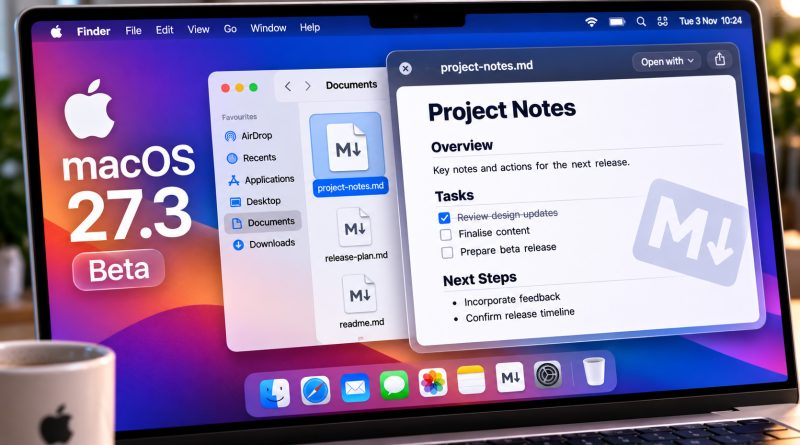
macOS 27.3 beta reported to give Quick Look formatted Markdown previews
The first developer beta of macOS 27.3 is reported to render Markdown files in Quick Look with styled headings, lists and links, rather than the raw syntax used to write them. For anyone who drafts documentation, notes or articles in .md files, that would turn a routine formatting check into a glance in Finder rather than a trip through an editor.
9to5Mac reported the behaviour, and Digital Trends, iPhoneSoft and the German outlet IT BOLTWISE have described it in similar terms. IT BOLTWISE carries a notice that its AI-generated content may contain errors. The accounts are secondary, several may derive from the same original article, and the material reviewed included no independent hands-on testing.
What changes in the preview
Until now, the reports say, Quick Look showed .md files as raw text, hash marks and asterisks included. In the beta, the same files are said to appear with their formatting applied: a heading is displayed as a heading, bold text as bold, and a list as a list.
The distinction matters to anyone who works with Markdown regularly. Raw syntax is readable, but it asks the reader to interpret structure. A rendered preview shows the result, and the reported change moves that second experience into the space-bar preview rather than a separate application.
The Finder and space bar route
iPhoneSoft gives the most detailed account of the workflow. It reports that a user selects an .md file in Finder and presses the space bar, and that the preview appears with styled headings, bold text, lists and links. No editor is needed, and no Quick Look extension has to be installed.
That workflow account comes from a single secondary report and could change before any public release. The underlying claim, that Quick Look can render Markdown in the beta, is described by all four outlets.
Why Markdown matters
Digital Trends and 9to5Mac both describe Markdown as a simple text formatting syntax introduced by John Gruber in 2004. It lets a writer set headings, emphasise text, build lists and add links using plain-text characters, and the text can then be converted into HTML. That combination has made it common in software documentation, blogs and online publishing.
For those users, the reported Quick Look behaviour would shorten a familiar loop: change a file, preview it, change it again. A formatted preview in Finder is quicker than launching a dedicated Markdown editor just to check whether a heading or list came out as intended.
Wider Markdown handling at Apple
9to5Mac also reports that Apple Notes can already import and export Markdown files. That detail is context for a broader pattern of Markdown handling on Apple’s platforms, but it does not establish how complete or stable the Quick Look rendering will be.
A more speculative connection comes from Federico Viticci. As reported by 9to5Mac, and described as apparent by IT BOLTWISE, he noted that Apple’s new Siri AI app skills use Markdown-based SKILL.md files to carry developer instructions for complex tasks inside apps. The claim is attributed to Viticci and is not confirmed by Apple documentation in the material reviewed. Digital Trends and 9to5Mac also describe Markdown as increasingly important for AI agents that store instructions and context in .md files; neither report offers measurement for that assessment.
These details are worth keeping separate from the preview feature itself. They suggest why Markdown matters to some Mac users, not that Quick Look’s rendering is complete, consistent across Markdown flavours, or guaranteed to reach a public release.
What remains unverified
No Apple release note, developer documentation or support page was included in the material reviewed, and no independent test of which Markdown elements render correctly, how large files behave, or how the preview handles different Markdown implementations was supplied.
The reports describe the feature as part of macOS 27.3 rather than beta 1 alone, a forward-looking claim that remains unverified. Apple’s release schedule for macOS 27.3 is not established in the material reviewed, so the timing of any public availability is unknown.
Markdown users have a reported reason to watch the next macOS betas, and a reason to test the preview themselves once a public build arrives. The open question is whether the formatted view survives to release, and how much of Markdown it handles when it does.
Whether a preview copes with an unusually long document, an awkward Markdown flavour or a table is a question no screenshot can settle, and much the same is true of most claims about how software behaves. Trying the thing yourself, somewhere a mistake costs nothing, is a habit worth building deliberately. Cybersecurity fundamentals gives that habit a shape: describing what a system is meant to do, observing what it actually does, and keeping the difference visible rather than smoothing it over. The Hack Academy’s online cybersecurity training programme lists cybersecurity fundamentals among its subject areas, with self-paced learning and practical exercises set alongside the theory, so the habit can be built on material you control. It will not tell you what macOS 27.3 will eventually ship with, but it makes the question of how to check a far more familiar one.