
How to verify an Apple mercenary spyware warning without trusting the message
Apple sent mercenary spyware threat notifications to targeted users in 110 countries on 13 August 2026, according to company statements reported by TechCrunch, BleepingComputer and HuffPost. That batch is not a new September campaign, but it raises an enduring question: how can a recipient authenticate a warning without trusting the message itself?
The safest response is not to decide whether the email or alert looks convincing. Apple tells recipients to verify the notification independently by manually entering account.apple.com in a browser and signing in. A genuine threat notification will also appear as a banner at the top of that Apple Account page.
Where a genuine Apple warning can appear
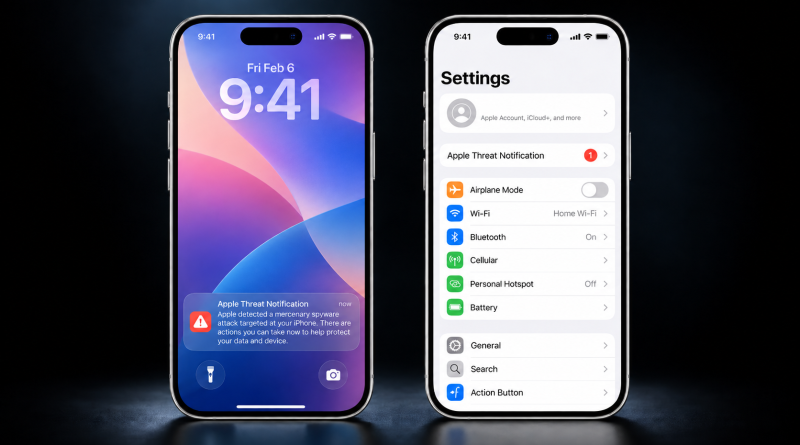
Apple’s 2026 guidance says threat notifications may appear directly on an iPhone Lock Screen and in Settings. They may also arrive by email from Apple Threat Notifications at threat-notifications@email.apple.com. The precise notification types can vary according to the device model and software version.
This distinction matters because HuffPost described the warning as arriving by text as well as email. Apple’s current documentation establishes a direct iPhone alert, an email and an Apple Account banner. It does not establish delivery through ordinary SMS.
A familiar sender name or official-looking layout is therefore not enough to authenticate a warning. The existence of Apple’s real notification programme does not make every message using its language genuine. No specific phishing campaign imitating the August alerts was established in the available research, but checking the Apple Account page avoids relying on the message itself.
Apple says its genuine notifications never ask recipients to follow links, open files, install applications or configuration profiles, or disclose an Apple Account password or verification code. A message making any of those requests does not match the company’s documented notification process.
Targeting does not prove compromise
Apple describes its threat notifications as high-confidence alerts that somebody may have been individually targeted by mercenary spyware. It also acknowledges that its investigations cannot provide absolute certainty. Recipients should take a confirmed warning seriously, but the notification alone does not establish that spyware successfully infected a device or that anyone accessed or stole data.
Apple has not disclosed the intelligence or technical indicators behind the August notifications. It has not publicly identified an exploit chain, vulnerability, spyware family, attacker, government, commercial supplier or geographical source. Recipient-specific forensic examination may establish more in an individual case, but those outcomes cannot be inferred from the alert itself.
The reported scope also needs care. Notifications reaching targeted users in 110 countries show broad geographical reach, not 110 countries full of confirmed victims. Apple has released neither the country list nor the number of recipients, and there is no public basis to state that every targeting attempt succeeded. Its support page separately says notifications have reached users in more than 150 countries in total since 2021.
Because Apple has not published the 110-country list, the public record does not establish whether Australia was included in that batch. The authentication and response guidance nevertheless applies to Australian Apple Account holders who receive such a warning, especially people exposed to elevated targeted-surveillance risks.
What Apple recommends next
After confirming that the alert appears at account.apple.com, Apple recommends enabling Lockdown Mode and seeking specialist assistance through the Access Now Digital Security Helpline. Lockdown Mode is a defensive step, not a guarantee that spyware cannot succeed, and the public information about this notification batch does not reveal whether any particular recipient was compromised.
Apple’s broader protective guidance includes installing current software updates, using a device passcode and biometrics, enabling two-factor authentication and Stolen Device Protection, and choosing strong, unique passwords or passkeys. It also advises installing applications through the App Store and avoiding unknown links and attachments.
The practical distinction is straightforward: independently confirming the banner establishes that Apple issued the warning, while the warning establishes high-confidence targeting rather than a proven infection. Questions about what tool was used, who operated it and whether it succeeded remain unanswered by the public record.
Independent verification and measured interpretation belong together when assessing a security alert. Bring that evidence-minded approach to wider technical study with The Hack Academy’s online cybersecurity training programme, which offers self-paced learning and practical exercises alongside theory in cybersecurity fundamentals.
