
Windows Has a Malware Problem. Mac Users Have a Confidence Problem
For years, consumer cybersecurity has been reduced to an unhelpful argument between two tribes.
Windows users are told their computers are magnets for viruses. Mac owners are assured that they made the safer choice. One group installs security software with a sense of resignation, while the other often assumes the design of the machine has already solved the problem.
New malware data appears, at first glance, to validate that divide.
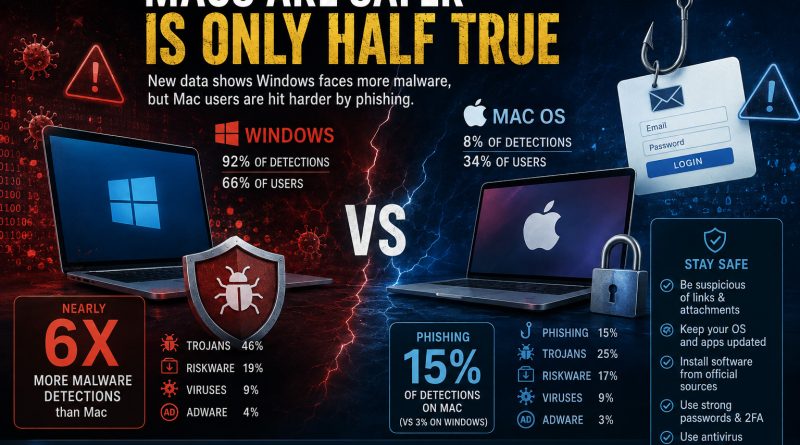
An analysis of 391,305 threat detections recorded between 1 January and 31 July 2026 found that Windows devices accounted for 92 per cent of detections, despite representing 66 per cent of the active users in the dataset. Mac users made up 34 per cent of the user base but generated only 8 per cent of detections. On a per-user basis, Windows recorded almost six times as many detections.
That is a significant difference, but it does not mean every Windows user is six times more likely to be compromised than every Mac user. The figures come from users of one company’s antivirus product, rather than a complete census of every computer connected to the internet. They measure detections within that particular environment, not every successful infection worldwide.
Even with that qualification, the pattern is difficult to ignore.
Windows remains the preferred hunting ground for conventional malware. Trojans accounted for 46 per cent of Windows detections, compared with 25 per cent on macOS. Riskware represented 19 per cent of Windows detections and 17 per cent on Mac, while viruses made up 9 per cent on both platforms.
From a criminal’s perspective, concentrating on Windows makes economic sense. Attackers want the greatest possible return from the malware they develop, distribute and maintain. A platform used across enormous numbers of homes, businesses, schools and government agencies offers a larger pool of potential victims.
Windows also supports a vast and varied ecosystem of software, hardware, business applications and legacy systems. That flexibility is one of its strengths, but it gives attackers more opportunities to disguise malicious programs as installers, utilities, updates or familiar workplace tools.
Mac users should resist the temptation to treat those figures as proof that they can relax.
The most revealing finding is not simply that Macs recorded fewer threats. It is that the threats reaching them were distributed differently.
Phishing represented 15 per cent of detections on macOS, compared with only 3 per cent on Windows. It was the third most common category detected on Macs, but ranked sixth on Windows.
These percentages do not mean more phishing was detected on Macs in absolute terms. Windows still accounted for the overwhelming majority of total detections. What they reveal is that social engineering occupies a much larger place within the Mac threat landscape.
That should concern anyone who has ever said, “I use a Mac, so I do not need to worry about cybersecurity.”
A secure operating system can make it harder for malicious software to install itself silently. It cannot prevent someone from entering their password into a convincing imitation of a login page. It cannot stop an employee from approving a fraudulent authentication request. It cannot protect a cryptocurrency wallet when its owner willingly downloads a fake application.
Most importantly, it cannot save a user who copies a malicious command from a website and pastes it into Terminal.
That is no longer a theoretical scenario. Security researchers have documented campaigns targeting Mac users with deceptive advertisements, counterfeit software downloads and so-called ClickFix instructions. Victims are told that they need to copy and run a Terminal command to complete a download, solve a technical problem or pass a verification check. The command instead installs an information stealer capable of collecting browser passwords, authentication data, cloud credentials, Keychain information and cryptocurrency wallet details.
The techniques are becoming more selective and sophisticated.
One campaign observed in 2026 used browser fingerprinting to identify visitors who appeared to be using genuine Mac hardware. Suitable targets were shown a malicious download page, while scanners, automated analysis systems and other visitors could receive harmless looking content. More than 250 associated front-end domains were confirmed during the investigation.
This is the real lesson behind the Windows and Mac comparison.
Cybercriminals do not care which operating system wins an online argument. They care about which method is most likely to work.
When Windows offers a large population of systems vulnerable to trojans, fake installers and malicious executables, attackers build for Windows. When Mac users become more difficult to compromise through traditional malware, attackers change the conversation. They create a convincing prompt, borrow the branding of a trusted company and persuade the victim to bypass the protections themselves.
The attack moves from the operating system to the person operating it.
This does not mean Mac security is a myth. It means “Macs are safer” is only a partial statement. A more accurate version would be that Macs may face fewer examples of some conventional malware, but their users remain exposed to credential theft, phishing, malicious downloads and social engineering.
The dangerous part is not the relative safety of the platform. It is the confidence that can grow around it.
Confidence becomes complacency. Complacency reduces scrutiny. A suspicious link looks less threatening because the user believes their machine will block anything dangerous. An unfamiliar installer feels acceptable because malware is thought to be somebody else’s problem. A Terminal command appears technical and legitimate because the victim assumes the system would stop it if it were harmful.
That is precisely the mindset social engineers exploit.
The answer is not to abandon Macs or panic every time an email arrives. Nor is it to assume Windows is hopelessly unsafe. Both platforms can be used securely, and both can be compromised.
The practical protections are largely the same.
Keep the operating system, browser and applications updated. Download software through official websites and recognised stores. Check the actual domain before entering credentials. Use unique passwords, a reputable password manager and strong multifactor authentication. Maintain current endpoint protection and reliable backups.
Never paste a command into Terminal, PowerShell or another system tool merely because a website tells you it is necessary. A legitimate service should be able to explain what a command does and why it is required. Urgency, vague technical language and demands to disable security controls should be treated as warning signs.
Businesses must go further. Technical controls should be supported by sensible access restrictions, endpoint monitoring, software installation policies and meaningful staff education. Current defensive guidance specifically recommends teaching users to recognise fake installers and ClickFix prompts, discouraging unofficial Terminal fixes, strengthening web protection and monitoring suspicious command activity.
Installing security software is valuable, but it is not the end of cybersecurity. The person making decisions at the keyboard remains part of the defence.
That is why security skills matter more than brand loyalty.
A well-trained Windows user who pauses, verifies and reports suspicious activity may be safer than an overconfident Mac user who assumes every threat will be blocked automatically. The strongest operating system cannot replace judgement, awareness and the ability to recognise manipulation.
Cybersecurity is not something you solve once by buying the right computer. It is a skill that must be developed, practised and updated as attackers change their tactics.
Strengthen your ability to recognise threats before they become breaches. Take The Hack Academy’s Online Training Programme and build the practical cybersecurity skills needed to protect yourself, your workplace and the people who depend on you.